
The $6.25/Terabyte Trap: Catching Expensive BigQuery Queries Before They Run

BigQuery is magic. You can query petabytes of data in seconds without managing a single server. But that magic comes with a loaded gun pointed directly at your infrastructure budget.
Unlike traditional databases like PostgreSQL or MySQL, BigQuery charges you based on the sheer volume of data your query scans. The current rate is $0.00625 per GB of data processed, which translates to $6.25 per terabyte (TiB).
That might not sound catastrophic until you realize that is the cost for one single query. If a junior developer hits "Run" on a bad query against a 10TB table, they just spent $62.50. If that query ends up in a cron job running every 5 minutes... well, you do the math.
I almost made this exact mistake this week, and the only thing that saved my wallet was my CI pipeline.
The Scenario: Querying PyPI Downloads
I wanted to pull some analytics on my open-source project, SlowQL. Google BigQuery hosts the public PyPI download statistics dataset (bigquery-public-data.pypi.file_downloads). I just wanted to know our download count over the last 30 days.
Here is the most natural way a backend engineer writes that query:
-- The Budget Killer
SELECT *
FROM `bigquery-public-data.pypi.file_downloads`
WHERE file.project = 'slowql';
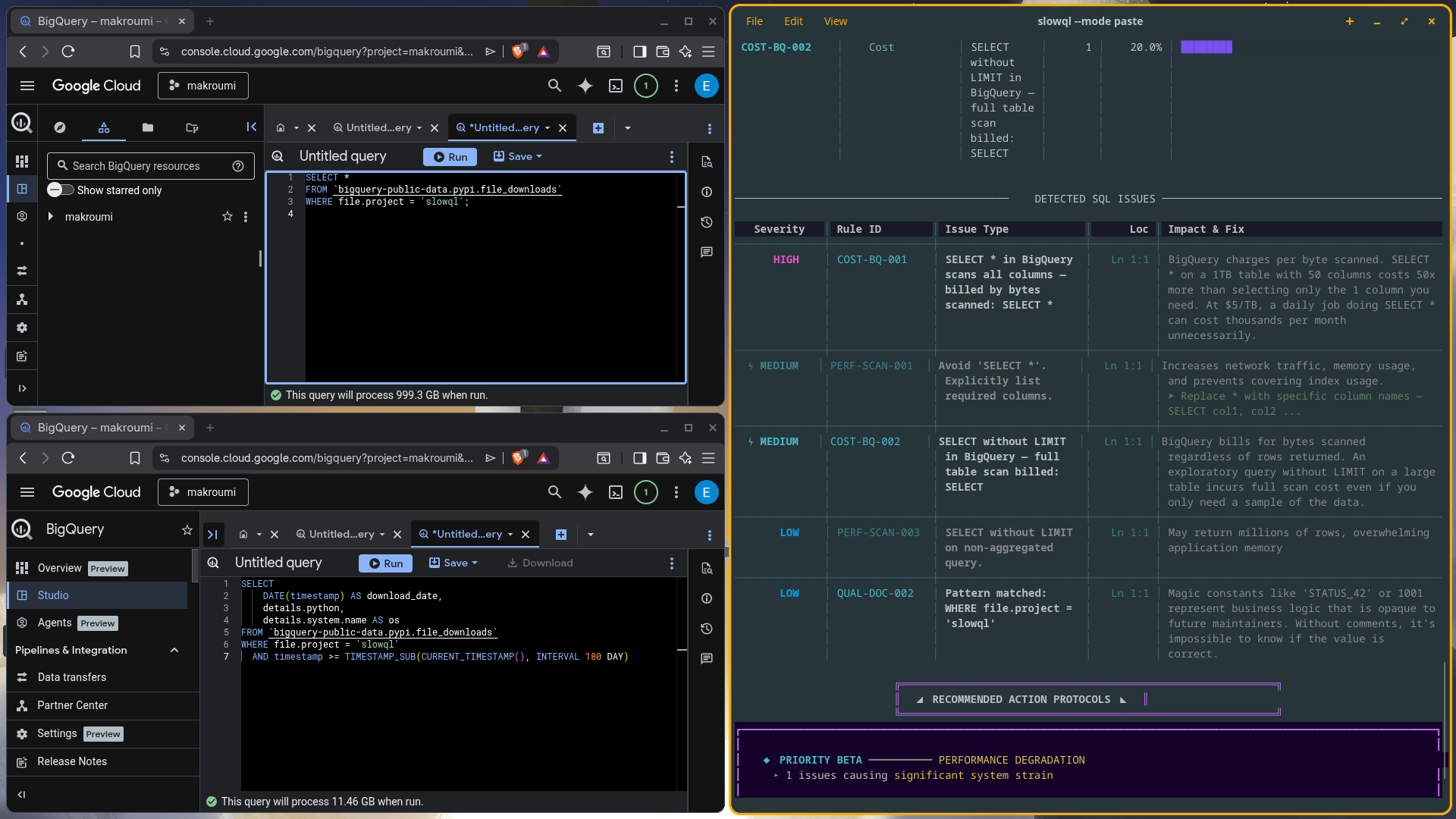
Why this query is a financial disaster If you run this in a local
Postgres instance, it's fine. In BigQuery, it’s a landmine.
Because BigQuery is a columnar database, using SELECT * forces the engine to scan every single column in the table, including massive string columns for user agents, TLS details, and metadata. Worse, because I didn't include a date filter, the engine has to scan the entire multi-year, multi-petabyte history of the PyPI registry just to find the rows matching my project.
At $6.25 per Terabyte, hitting enter on this query could have easily cost me hundreds of dollars for a single execution.
The Interception (Breaking the Build)
Before I could accidentally run this, my local pre-commit hook caught it in milliseconds. I built SlowQL, an offline-first SQL static analyzer, specifically to catch these operational nightmares before they reach production .
The analyzer failed my build and threw these exact errors:
❌ [COST-BQ-001] HIGH: SELECT * in BigQuery Scans All Columns
❌ [COST-BQ-002] MEDIUM: BigQuery Query Without LIMIT
❌ [PERF-SCAN-001] MEDIUM: SELECT * Usage
Because SlowQL runs entirely offline with zero database dependencies, it caught this structural flaw using its AST parsing engine without ever needing a live connection to GCP .
The Cost-Optimized Fix
SlowQL told me exactly why the query was dangerous, so I rewrote it to respect BigQuery's columnar architecture:
-- Optimized, cost-efficient, and CI-approved
SELECT
    DATE(timestamp) AS download_date,
    details.python,
    details.system.name AS os
FROM bigquery-public-data.pypi.file_downloads
WHERE file.project = 'slowql'
    AND timestamp >= TIMESTAMP_SUB(CURRENT_TIMESTAMP(), INTERVAL 180 DAY) -- Partition pruned!
The difference? By specifying exactly three columns instead of using *, and adding a timestamp filter to prune the partition down to just the last 30 days, the data scanned dropped from petabytes to a few gigabytes.
The query cost dropped to a fraction of a penny. And the data was highly validating.
Stop paying for bad SQL
Cloud costs aren't a mystery; they are usually just unoptimized SQL bypassing code review.
If your team uses Snowflake, BigQuery, or Athena, you can't rely on human reviewers to catch missing partition filters. I built SlowQL with 33 specific rules dedicated to cloud cost optimization , and you can run it for free.
Drop a star on the SlowQL GitHub repo or add the official GitHub Action to your pipeline today to stop these budget-killers before they are merged.


